
Exchange Online Archiving archives email from your primary mailbox in order to reduce its size. It creates an additional mailbox known as an In-Place Archive or Online Archive that works in tandem with your primary mailbox.
Emails move from your primary mailbox into your online archive automatically after they reach a certain age (typically 1 year). They move into the equivalent folder in the Online Archive, so if you create a folder in your primary mailbox, it will be created for you in your online archive. Since the archive size is unlimited, this means you can store an unlimited amount of email once an archive mailbox has been created for you.
The Archive will appear below your other folders in Outlook on PC or Outlook on the web.
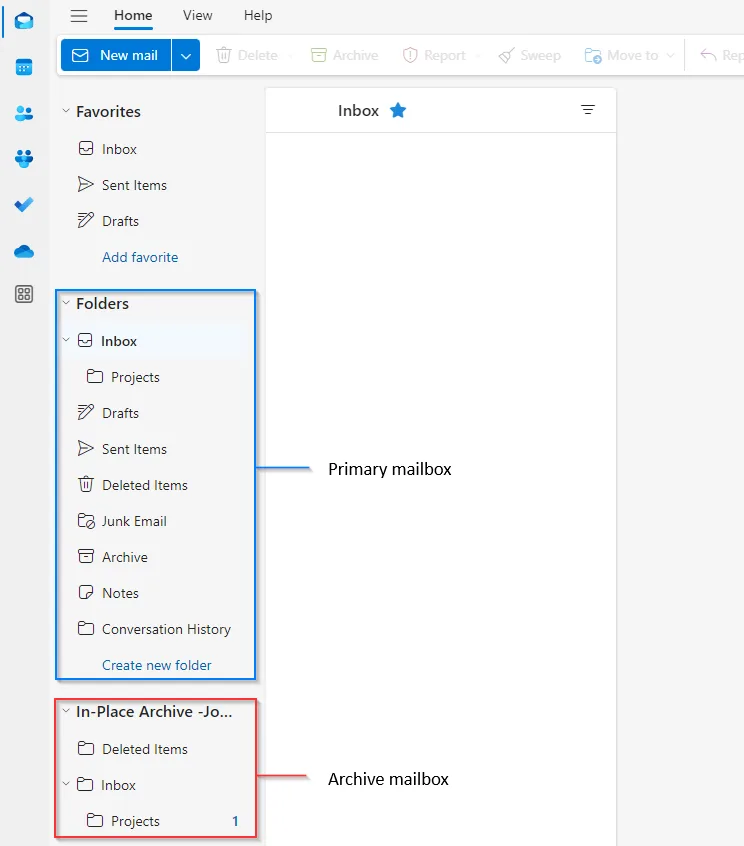
The easiest way is to click in your Archive inbox, then use the search bar at the top. You can also click on folders to browse emails in the archive.

An archive mailbox is not created automatically — an administrator has to turn it on per user. You also need a licence that includes it: Exchange Online Plan 2, or Microsoft 365 E3/E5 (and Business Premium includes a smaller archive).
In the Exchange admin center:
Or do it in bulk with PowerShell:
Connect-ExchangeOnline

# Enable the archive on a single mailbox
Enable-Mailbox -Identity user@contoso.com -Archive

# Enable the archive for everyone without one
Get-Mailbox -ResultSize Unlimited -Filter { ArchiveGuid -eq $null } |
  Enable-Mailbox -Archive
The archive can take a few minutes to provision — it will not appear in Outlook until it does. You can check progress with Get-Mailbox -Identity user@contoso.com | Select-Object ArchiveStatus.
The archive is filled by a retention policy, not by hand. A default policy (Default MRM Policy) moves items into the archive after they reach the configured age — usually two or three years, not the one year some older documentation suggests.
To change it, use Retention tags and Retention policies under Data lifecycle management in the Exchange admin center, then apply the policy to the mailbox. You can also let users move items manually from Outlook with Archive button, or by dragging a message into the archive folder.
These three get confused constantly, and they do different jobs:
| Feature | What it does |
|---|---|
| Online Archive | A second mailbox that stores older mail so your primary mailbox stays under quota. The user can still read and search it. |
| Retention policy | Decides how long items are kept and when they are deleted or moved to the archive. |
| Litigation hold / eDiscovery hold | Preserves items even if a retention policy would delete them. Used during an investigation. |
Turning on an archive does not preserve anything by itself — if a retention policy is set to delete after a period, the item is deleted whether it sits in the primary mailbox or the archive.
No. OneDrive stores files, not mailbox items, and there is no supported way to move email from Exchange Online into OneDrive automatically.
The usual reasons people ask are solved differently:
You can, however, save individual attachments or messages from Outlook into OneDrive manually — that is a user action, not an archiving feature.
How long does it take for the Online Archive to appear? Usually a few minutes, occasionally up to an hour. Restart Outlook if it does not show up straight away.
Do archived emails still count against my mailbox quota? No. The archive has its own quota — in practice effectively unlimited on the plans that include it.
Can users see and search the archive themselves? Yes. It appears as a separate folder in Outlook on the web and Outlook for Windows, and it is searchable.
Is the archive available offline? No. It requires a connection to Exchange Online.

