
This is how to fix an error received when trying to create a chat from a Work (Microsoft 365 business) account and a Teams free or personal account.
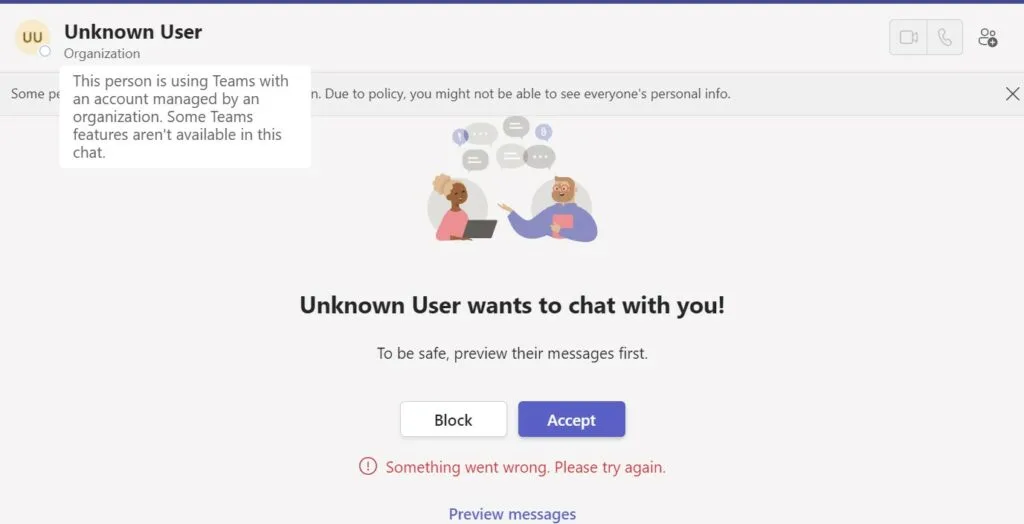
You try to initiate a chat with someone outside your organisation. They receive the message, click Accept, and then get an unhelpful error: “Something went wrong. Please try again.”
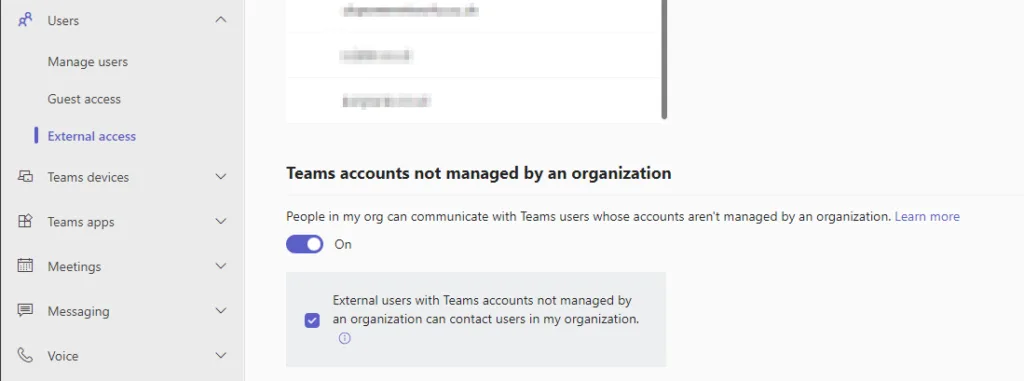
This issue happens if you don’t have both of the below boxes checked in Teams admin, under Users > External access:
Leave this at least one hour before asking the personal user to try again. They may need to click block/unblock a few times to get this working.
This doesn’t entirely make sense — you would think that enabling the first option would allow internal users to initiate a chat with a Teams personal user. However, in multiple test tenants we found that it was required to tick the second box as well, otherwise the personal user could not accept the chat request.
Note: This is a potential security issue, since Teams personal users could send unsolicited messages to internal users. Be aware that you open your users up to spam if you turn this on.
Can a work account chat with a personal Teams account? Yes — once external access to unmanaged Teams accounts is enabled. Both checkboxes under Users > External access need to be ticked, as described above.
Does this need a policy change from an admin? Yes. It’s a tenant-wide setting in the Teams admin centre, so an administrator has to apply it; end users can’t change it themselves.
How long does the change take to apply? Allow at least an hour before the personal user tries again. In some tenants it takes longer to propagate.

